MyHeritage Photo Enhancer & In Color Review: Breathe New Life into Old Memories
Ever stared at a faded, black-and-white photograph of your ancestors and wished you could see them more clearly? What if you could not only sharpen their features but also see the world they lived in, in full, vibrant color? That’s the magic offered by MyHeritage — Photo Enhancer & In Color, a suite of powerful AI tools from the renowned genealogy company, MyHeritage. This isn’t just about image correction; it’s about connecting with your past in a deeply personal and visually stunning way. The platform leverages cutting-edge AI to repair, colorize, and even animate old family photos, turning historical artifacts into living memories.
Capabilities
MyHeritage’s tool suite is laser-focused on one primary domain: Image Processing & Restoration. It is exclusively designed to work with photographs, particularly older or damaged ones. It does not generate images from text prompts, nor does it have capabilities related to text, video, or audio generation. Its strength lies in taking existing visual data (your photos) and dramatically improving their quality and impact through specialized AI models trained for historical photo restoration.
Features
MyHeritage packs a powerful punch with several distinct, easy-to-use features that work together to transform your photo collection. The user experience is incredibly simple: just upload a photo, and the AI does the rest in seconds.
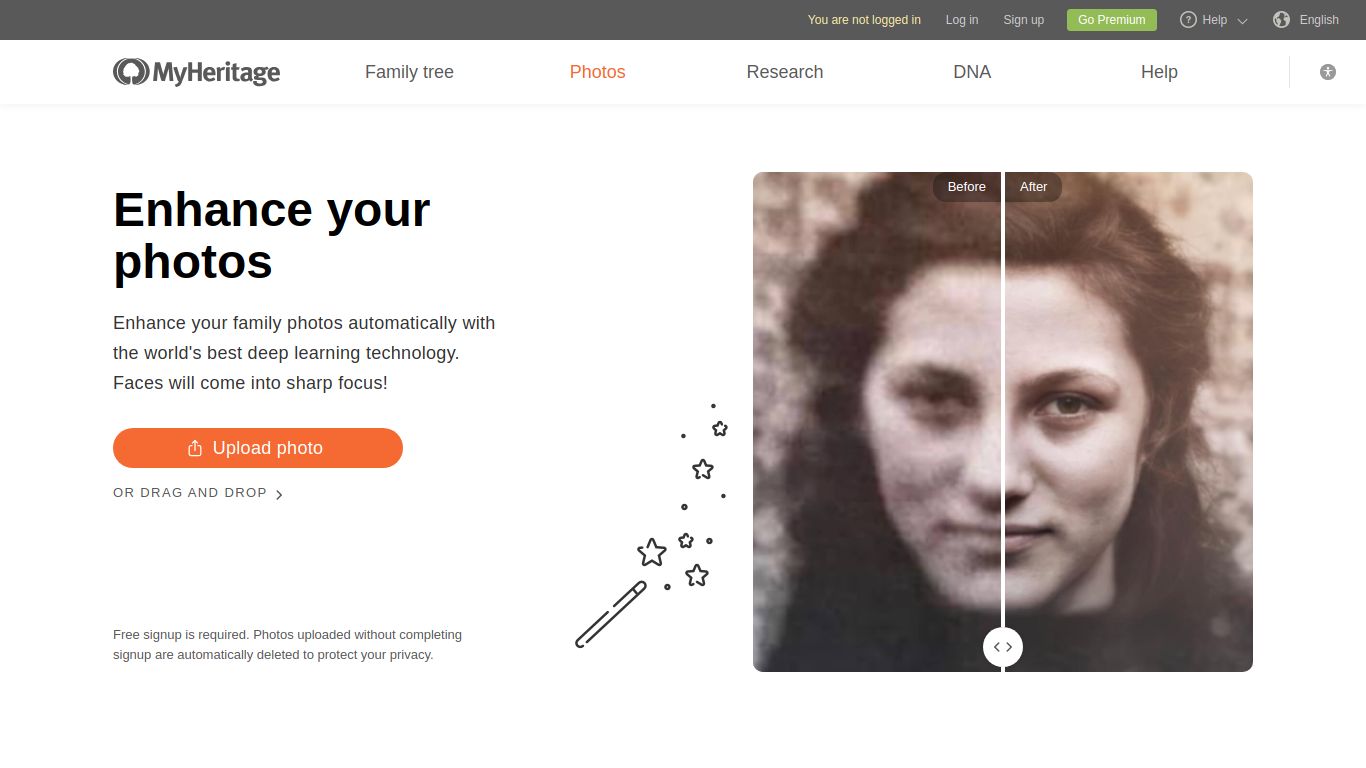
- Photo Enhancer: This core feature automatically sharpens blurry or out-of-focus faces with remarkable clarity. It enhances the resolution of the entire photo, bringing previously unseen details to the forefront.
- In Color™: The colorization tool breathes life into monochrome images. Using sophisticated deep learning algorithms, it realistically predicts and applies colors to black-and-white photos, creating a vivid and authentic result.
- Photo Repair: Got photos with scratches, tears, or creases? The Photo Repair feature automatically detects and fixes these imperfections, smoothing out the damage to restore the image to its former glory.
- Deep Nostalgia™: A truly unique and viral feature, Deep Nostalgia™ animates the faces in your still photos. It creates a short, high-quality video loop where your ancestors smile, blink, and turn their heads, offering a surreal and moving glimpse into the past.
- Side-by-Side Comparison: Every tool provides a convenient slider to instantly compare the original photo with the enhanced version, allowing you to appreciate the full effect of the transformation.
Pricing
MyHeritage operates on a freemium model, allowing you to test its capabilities before committing to a subscription. Here’s a breakdown of the general structure:
- Free Trial: You can enhance, colorize, and repair a limited number of photos for free. These results will typically have a MyHeritage watermark. This is a great way to see the magic for yourself without any cost.
- MyHeritage Complete Plan: To unlock unlimited photo enhancements, colorizations, repairs, and animations, you generally need to subscribe to the MyHeritage Complete plan. This is an annual subscription that not only gives you full access to the photo tools without watermarks but also includes the platform’s extensive genealogy features, such as family tree building and access to historical records. The plan provides the best value for users serious about both photo restoration and family history research.
Applicable Personas
This tool is perfect for a wide range of users, each with a unique connection to the past. If you fall into any of these categories, MyHeritage is for you:
- Family Historians & Genealogists: The primary audience. These tools are invaluable for adding visual context to family trees and research.
- Nostalgia Enthusiasts: Anyone who loves looking through old family albums and wants to see them in a new light.
- Social Media Users: Perfect for creating compelling #TBT (Throwback Thursday) posts or sharing revived family history with relatives online.
- Archivists and Curators: Professionals who need a quick and effective way to restore and colorize historical photographs for collections or exhibits.
- Gift Givers: A beautifully restored and colorized photo of a grandparent or great-grandparent makes for an incredibly thoughtful and personal gift.
Alternatives & Comparison
While MyHeritage has a unique position due to its integration with genealogy, there are other standalone tools in the market. Here’s how they stack up:
- Remini: A very popular mobile-first app known for its powerful AI face enhancement. It’s excellent for quick, on-the-go touch-ups of modern and old photos but lacks the deep genealogy context and features like Deep Nostalgia™.
- VanceAI Photo Restorer: A dedicated web-based tool focused purely on AI photo restoration, sharpening, and denoising. It’s a strong competitor on a technical level but doesn’t offer the all-in-one platform experience of MyHeritage.
- Adobe Photoshop (Neural Filters): For professionals, Photoshop’s AI-powered Neural Filters offer incredible control over colorization and restoration. However, it comes with a steep learning curve and a higher price tag, making it less accessible for casual users.
Conclusion: For users whose primary goal is to reconnect with their family history, MyHeritage Photo Enhancer & In Color is unparalleled. It combines best-in-class AI restoration with a world-class genealogy platform, creating an experience that is both technologically impressive and emotionally resonant. While other tools may offer similar functions, none wrap it in such a meaningful and purpose-built package.
